
2026-08-29: Structured tasting and an iOS app
This has been a pretty big week, as has the past couple of weeks - and it’s starting to show. There’s still a lot of work to be done, but it’s starting to feel like I’m nearing polish and edge-cases. As such, don’t expect as much to happen in the coming weeks. I’ll still provide updates - there’ll probably be something to talk about, and don’t consider the project to be anywhere near stable, but it’s definitely getting usable.
Now, let’s get to what’s happened: Shots can now be tasted as well as measured, there’s an iOS app to taste them in, the machine and Plantlet have started talking to each other both ways, the Silvia has grown an SD card, and the two firmwares’ command handling has collapsed into a single dispatcher.
The first two of those are the headline, so I’ll start there.
Structured tasting
Plantlet has always recorded what the machine did - pressure, flow, weight, time - and absolutely nothing about what came out of it. That’s only half a record. I can go back to a shot log from a month ago and read the curve exactly as it was, but I can’t go back a month and remember whether the shot was sour.
So shots can be tasted now, and it’s a structured tasting, not a star rating.
The reason it’s structured comes down to one split. There are three quite different things that get squashed into a single score in more or less every coffee app, and they answer different questions with different lifetimes.
There’s preference - did I like it? That’s what tells you whether to buy the bag again, and it stays useful long after you’ve forgotten the individual shot. Then there’s perception - what did it taste like? That’s what makes a shot findable six months later, and it’s the only one of the three that’s really comparable between two people, assuming they’re drawing on the same vocabulary. And finally there’s diagnosis - what should I change? That one is only comparable between shots on the same bag, and it goes stale the moment you open a new one.
The SCA made the first of those splits in their Coffee Value Assessment, separating descriptive from affective scoring after decades of the old cupping form muddling the two together. The third column is my own addition, and that’s simply because a cupping protocol doesn’t assume you’ve got a machine sitting there to go and adjust. Here you do.
In practice that comes out as five layers. A bag and a grinder are proper entities, so you don’t retype them for every shot. The verdict is two numbers. Perception is six unipolar intensity axes, plus canonical descriptor and defect tags. And the diagnosis is a next adjustment that you pick yourself - the app doesn’t infer one on your behalf.
The bit I’m most pleased with is that every point on every scale has a word attached to it - nine per verdict, six per axis. A bare number isn’t really an observation, and it isn’t comparable between two people either. My 3 and your 3 aren’t the same claim about a shot, whereas “gentle” and “gentle” are at least in the same neighbourhood. It costs a slightly wider row on screen, which I think is well worth it - otherwise what you’re left with a month later is a column of digits.
The vocabulary itself is a frozen constant in a shared package, not a table in the database, so a term means exactly one thing everywhere - the same identifier in the web app, in the iOS app, and in anything that reads the data later.
The iOS app
The flow I actually want goes like this: you pull a shot, the machine uploads it on its own (which it’s been doing since last week), and by the time you’ve got the cup in your hand, your phone is asking you what it tasted like. The tasting really has to happen while the coffee is in front of you, because a tasting note written an hour later is a note about your memory, not about the shot.
So there’s an iOS app now.
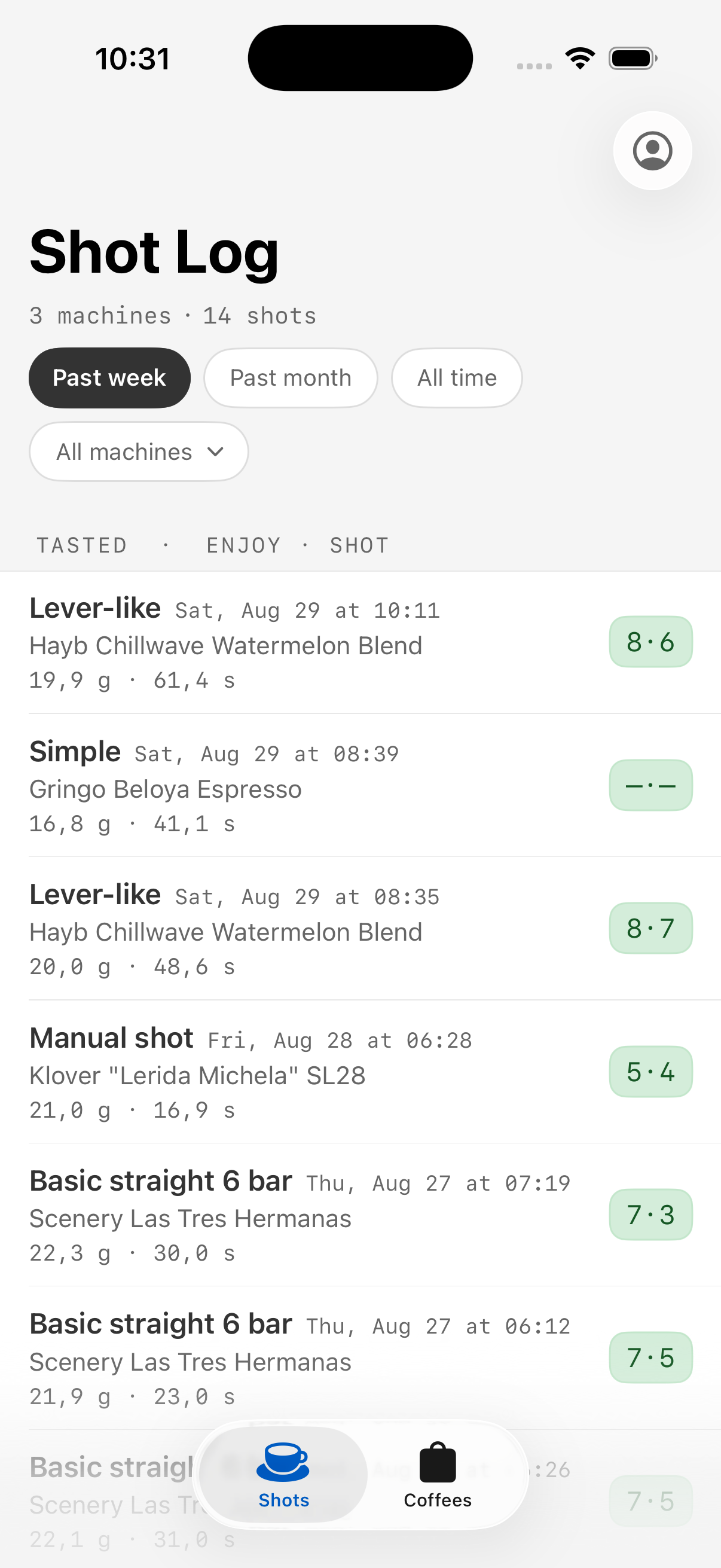
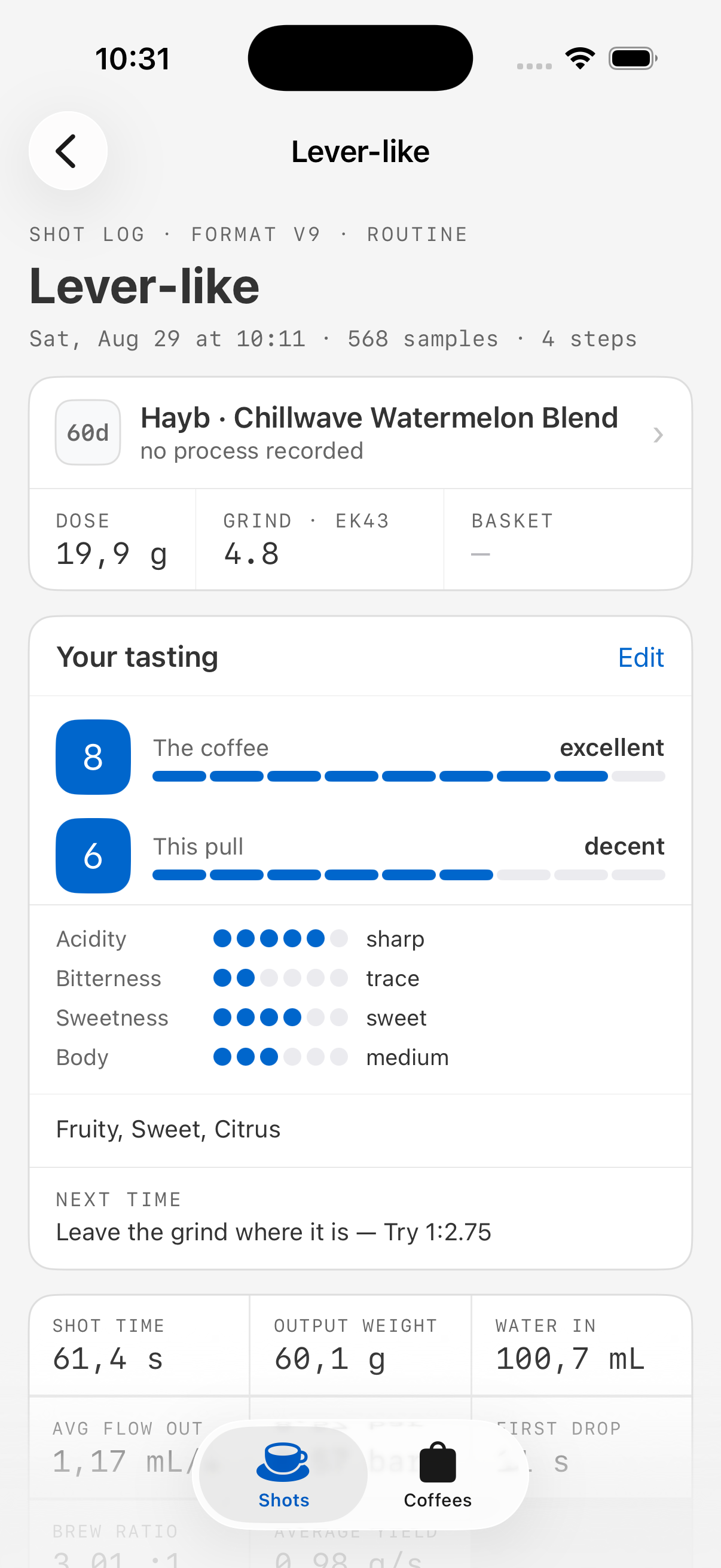
You can sign in, look at a shot log with the unrated shots sorted to the top, open a shot and see its curve, statistics and step table, and then fill in the tasting sheet. Bags can be picked or created on the spot, because standing at the machine with a bag that nobody has entered yet shouldn’t be a dead end. This week it also got a Coffees tab and a screen for a bag, so a bag is somewhere you can actually go and look, instead of something you fill in once and never see again. It’s also got an app icon and a launch screen now, which makes it feel a good deal less like a debug build.
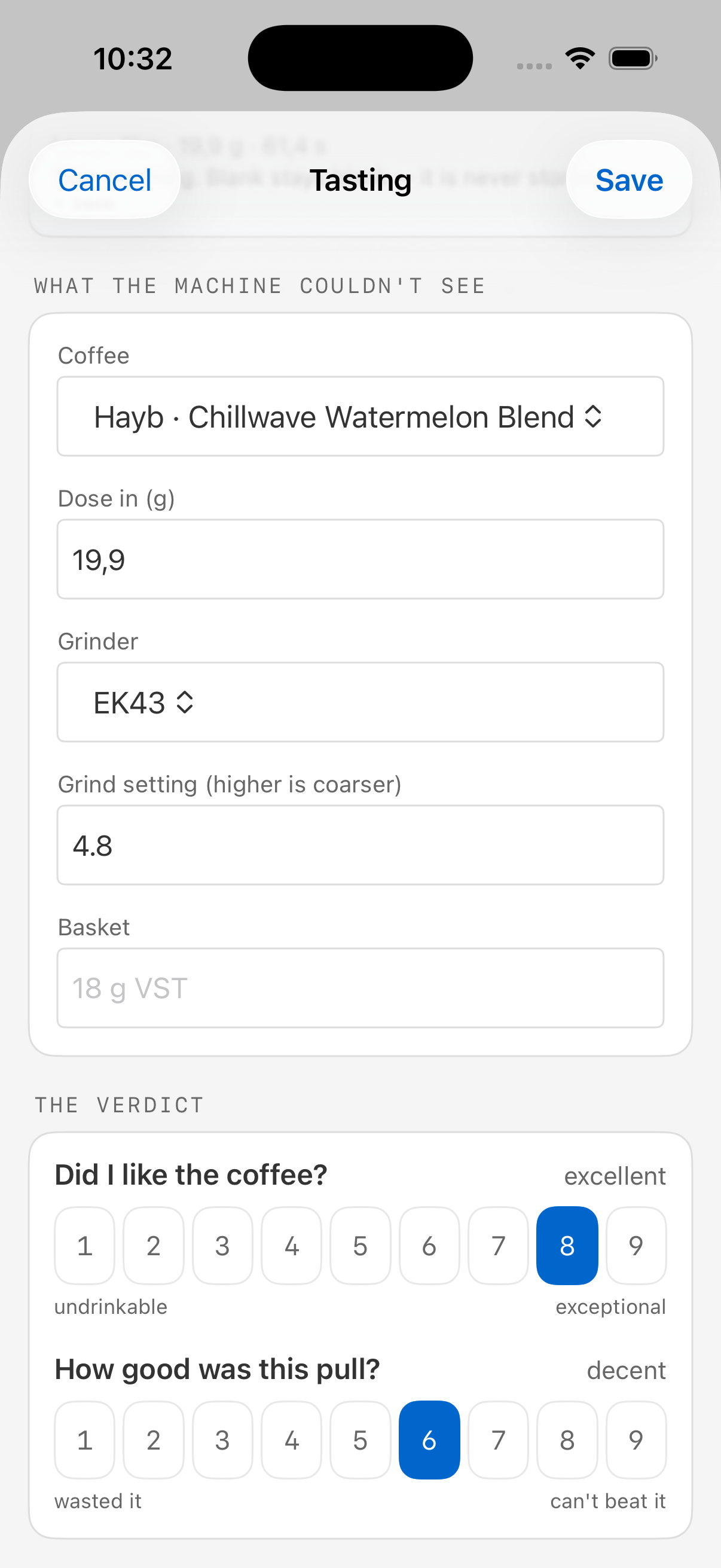
When a new shot is uploaded, you get a push notification encouraging you to rate it, so that you don’t have to try to remember what it tasted like afterwards. Utility shots, like group flushes or backflush routines are excluded, of course.
The app will be open source like everything else, but unlike the rest of the project it isn’t exactly self-hostable. Distributing an iOS app is Apple’s business, not mine, and the source being available doesn’t change that much.
What it does do is let you point it at your own Plantlet. The server is a setting, quite deliberately, because Plantlet is self-hostable and there’s no single address the app could sensibly be built against.
Over the coming weeks I’m looking to add machine provisioning, scheduling and a limited subset of machine control to the app.
The bag view
Making a bag a proper entity is what makes “how did this coffee behave over the fortnight it was open?” a question you can actually ask, so it’s now got a screen to ask it on.
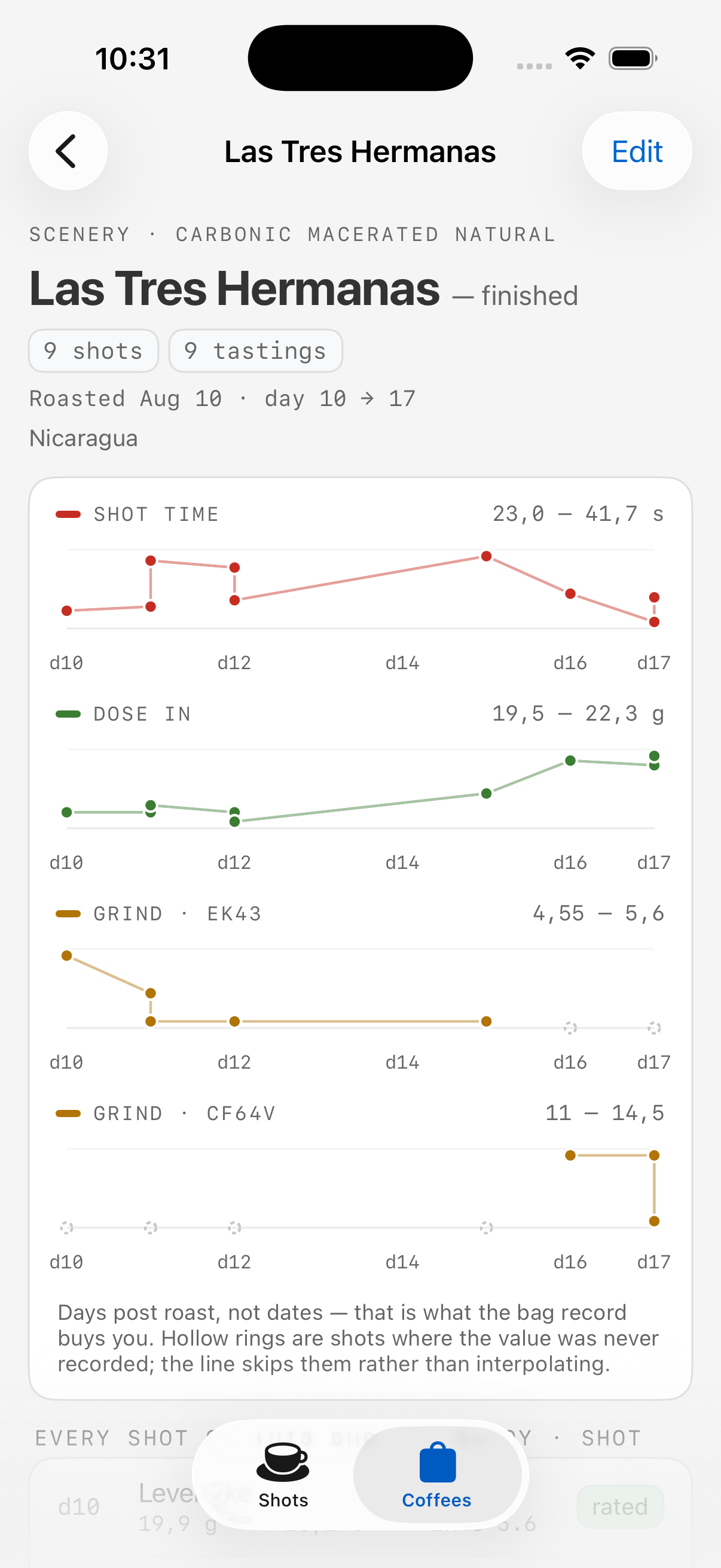
There are three things on it: small multiples of shot time, dose and grind setting plotted against days post roast, a list of every shot on the bag with its day number and verdict, and the roaster’s claims held up against what anybody actually tasted.
Days post roast is the x axis because it’s the axis you get for free once a roast date is recorded once per bag. It’s also the thing a bag view has that a shot list can’t get to - you can sort a list by date, but it won’t tell you the shot was on day four.
Nothing on that page interpolates, which I think is the important part. A value nobody recorded shows up as a hollow dashed ring on the baseline and a break in the line, and the loudest thing on the screen is a sentence counting how many of them there are. If seven out of ten shots have no grind setting recorded, then “did going coarser help?” isn’t a question this bag can answer yet, and the page ought to say so. A chart that quietly joined the dots would look a great deal better and teach you nothing. As it is, it’s a decent argument for filling in the sheet.
Grind setting is stored as text on purpose, because “14”, “3.2” and “2.5 turns” are all perfectly real answers to that question. A bag can also outlive a hopper change, so there’s one strip per grinder that recorded a number, and a setting that doesn’t parse turns into a gap on the chart and gets printed in full in the list underneath. Two grinders’ numbers sharing a single axis would be two scales pretending to be one.
The uplink goes both ways
Last week’s news was that shots upload themselves over Noise. This week the machine and Plantlet hold an actual conversation - a Noise-encrypted WebSocket, from the machine up to a hibernating object on the server side.
Over that link the machine sends its status, its configuration and its routine listing. The listing carries a checksum per routine, so the server can tell when its copy and the machine’s have drifted apart (and, more usefully, which of them drifted).
It also sends a machine definition, which is the new bit. That gets sent once when the connection comes up, and not on a timer, since a definition describes hardware - unlike a status, there isn’t anything about it to poll for.
It’s there for one fairly concrete reason. The definition maps a routine slot to the name of the panel button that’s bound to it, so Plantlet can offer to put a routine on the Water button instead of on slot 3. A bare slot number means nothing at all to the person doing the choosing, and up until now there was no way for a server to find out what the buttons on your machine are called.
The Silvia catches up
Last time I wrote that there was a lot of de-duplication left to do between the GS3 and Silvia firmwares, and made a remark about how you go about eating an elephant. This week I took a few bites.
Every command that both machines understand is now dispatched from one place. There’s exactly one match over the machine command enum in the whole crate, both controllers implement a trait, and neither of them does any dispatching itself. That gets back a property that had quietly been lost by having two exhaustive matches sitting in two files: adding a variant to the enum is now a compile error in the dispatcher, and if the answer to that new variant turns out to be “the two machines differ here”, then the new required method on the trait is a compile error in both implementations. Either way I get told about it at build time, for both machines.
The trait is accessors first and behaviour second, which is the part that makes this actually worth doing, and not just tidy. What a shared command actually does now lives in modules that can be built and tested on a host, and the machine’s only job is to hand it the field it works on. Both controllers sit behind a hardware feature gate that pulls in a Cortex-M peripheral crate and can’t link on a development machine, so anything living inside them has been untestable by construction for as long as they’ve existed. Getting the work out from under that gate is most of the value here.
An SD card on the Silvia
The Silvia has been logging shots to RAM and then dropping them, which is a fairly unsatisfying way to run a shot log.
It’s got a card now, running in SPI mode, driven by an SPI master built out of the RP2350’s programmable IO block instead of an actual SPI peripheral. That’s not me being clever for the sake of it - the card slot isn’t wired up to pins that a real SPI peripheral can reach, and both of the ones the chip has are spoken for anyway.
The other transport - the native four-bit one, which is the path that would give the card its full bandwidth - has been parked on a branch. It has never brought a card up, on either board, and at some point the sensible thing to do is stop and write down where you got to.
So that’s what it’s got now: a writeup recording what the evidence rules out, the one hardware unknown that’s left, the one hypothesis in the code that fits the symptom exactly, and (most usefully, I think) two things that I briefly believed and that turned out to be wrong, so that nobody - me, in three months - has to re-derive them from scratch.